
Refer to the exhibit

A wireless engineer has integrated the wireless network with a RADIUS server. Although
the configuration on the RADIUS is correct, users are reporting that they are unable to
connect. During troubleshooting, the engineer notices that the authentication requests are
being dropped. Which action will resolve the issue?
A. Allow connectivity from the wireless controller to the IP of the RADIUS server.
B. Provide a valid client username that has been configured on the RADIUS server.
C. Configure the shared-secret keys on the controller and the RADIUS server.
D. Authenticate the client using the same EAP type that has been set up on the RADIUS server.
Explanation:
The exhibit shows a RADIUS authentication failure with the specific error: "11036 The Message-Authenticator RADIUS attribute is invalid" . This error is a definitive indicator of a shared-secret mismatch .
The Message-Authenticator attribute is a required security feature in RADIUS, used to protect the integrity of Access-Request packets and prevent spoofing attacks. It is created by generating an MD5 hash of the entire RADIUS packet using the shared secret as the key. When the RADIUS server receives the packet, it performs the same calculation. If the calculated hash does not match the hash in the attribute, the server determines the packet has been tampered with or the shared secret is incorrect, and it drops the request . Since the configuration on the RADIUS server is stated to be correct, the mismatch is on the WLC side; the shared secret configured for the RADIUS server must be re-entered or verified to match exactly on both devices.
Why the other options are wrong:
A. Allow connectivity from the WLC to the RADIUS IP:
While connectivity is necessary, the specific error indicates a cryptographic authentication failure, not a network connectivity issue.
B. Provide a valid client username:
An invalid username would produce a different error, such as an "Access-Reject" response from the RADIUS server.
D. Authenticate using the same EAP type:
An unsupported EAP method would typically result in an "Access-Reject" due to policy mismatch, not the specific "Message-Authenticator invalid" error.
References:
Cisco ISE Admin Guide: "Message-Authenticator" attribute validation in RADIUS.
The error code 11036 specifically points to an invalid Message-Authenticator.
An organization is supporting remote workers in different locations. In order to provide wireless network connectivity and services, OfficeExtend has been implemented. The wireless connectivity is working, but users report losing connectivity to their local network printers. Which solution must be used to address this issue?
A. OEAP gateway override
B. OEAP split tunnel
C. WLAN static IP tunneling
D. FlexConnect local switching
Explanation:
Users are losing connectivity to their local network printers because all traffic from the corporate SSID is being tunneled back to the corporate network by default. This prevents the OEAP from communicating directly with devices on the home network.
The OEAP split tunnel feature addresses this by allowing local traffic to be switched locally at the AP while corporate traffic continues to be sent through the CAPWAP tunnel.
Why the other options are wrong:
A. OEAP gateway override:
This is not a standard feature name for enabling local network access. The correct term is split tunneling, which provides the necessary local access capabilities.
C. WLAN static IP tunneling:
This is not a valid feature for this scenario. Tunneling traffic to a static IP does not resolve the need for local network printer discovery.
D. FlexConnect local switching:
While FlexConnect enables local switching in branch office deployments, the documented solution for remote home office printing specifically is split tunneling. The OEAP must support local communication while maintaining corporate SSID operation.
References:
Cisco OEAP Split Tunneling Documentation – Traffic management and classification using ACLs
Cisco OEAP-600 Configuration Guide – Split-tunnel for printer feature enables local printing from corporate clients
A company has a Cisco wireless solution and uses Cisco ISE to authenticate corporate users using 802.1X. Users must be grouped by endpoints, and a policy profile must be added and then assigned to an identity group. What is the configuration path in the Cisco ISE user interface?
A. Policy > Profiling > Profiling Policies > Add
B. Policy > Policy Elements > Profiling > Add
C. Policy > Posture > Posture Profile > Add
D. Policy > Client Provisioning > Client Provisioning Policy > Add
Explanation:
The search results focus heavily on configuring policies like Client Provisioning, Posture, and Authorization, but they clarify how different policy types are organized in the ISE UI. For instance, a Client Provisioning policy is found under Work Center > Client Provisioning, and Authorization Profiles are configured via Work Centers > Policy Elements > Authorization Profiles.
Therefore, to configure a "Profiling" policy, you would navigate to Policy > Profiling. The correct path should be:
Navigate to the Policy menu.
Select Profiling.
Choose Profiling Policies.
Click Add to create a new policy.
Why the other options are wrong:
B. Policy > Policy Elements > Profiling > Add:
This path is incorrect for creating a new policy. The Policy Elements section is typically where you create reusable components like downloadable ACLs or authorization profiles, not where you create the policies that use them.
C. Policy > Posture > Posture Profile > Add:
This path is used for configuring Posture policies, which are for endpoint compliance checks, not for grouping endpoints by profiling.
D. Policy > Client Provisioning > Client Provisioning Policy > Add:
This path is for configuring Client Provisioning policies, which manage the deployment of the Cisco Secure Client and onboarding profiles, not for profiling endpoint attributes.
References:
Cisco ISE documentation indicates that creating reusable policy elements is done under the Policy Elements section, distinguishing it from creating the policies themselves.
The hierarchy for Client Provisioning and Posture policies is different, confirming that the correct path for Profiling is under the Profiling menu directly.
Refer to the exhibit
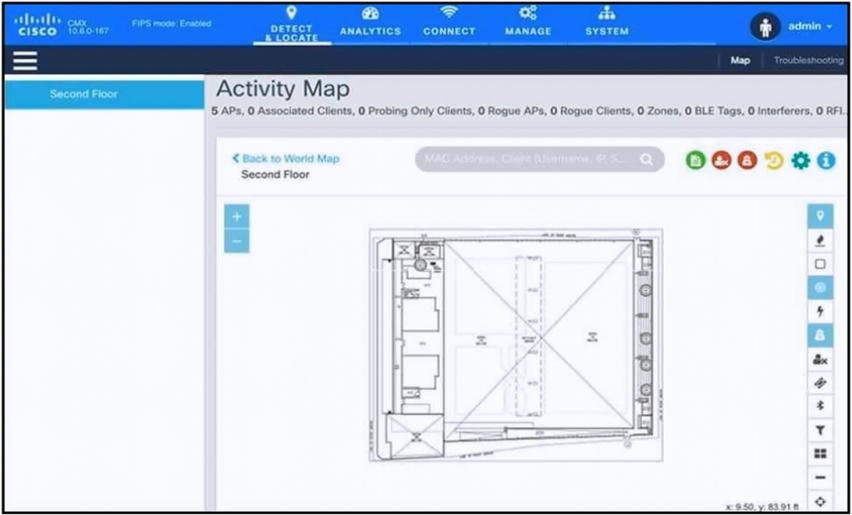
An engineer has deployed the Cisco CMX solution to track and detect the number of users
who visit the office each day. The CMX dashboard is not showing any data. Which action
resolves this issue?
A. Configure Single Sign-On authentication.
B. Add the WLCs to CMX.
C. Copy the exported Maps from CMX server to PI using SCP.
D. Install an evaluation license to CMX server.
Explanation:
The CMX dashboard is not showing any data because the controllers that generate the location data have not been added to the CMX configuration. For CMX to receive and display location and analytics data, the Wireless LAN Controllers must be added as a source . Until the WLCs are added and a successful NMSP tunnel is established, the CMX will have no client data to display .
Why the other options are wrong:
A. Configure Single Sign-On authentication
– SSO is for user authentication and access control, not for establishing the data feed from the WLCs. This does not affect the reception of client data .
C. Copy exported maps from CMX server to PI using SCP
– This is related to importing map data for location visualization, not to enabling the core data flow from the controllers. It would not resolve the "no data" issue .
D. Install an evaluation license to CMX server
– New CMX installations come with 100 evaluation licenses already installed . Even if the evaluation license expires, CMX analytics functions continue to work in the background , so a lack of license would not cause a complete absence of data.
References:
Cisco CMX and Catalyst 9800 WLC configuration guide: Adding WLC to CMX establishes the NMSP data tunnel .
Cisco CMX licensing Q&A: Evaluation licenses are pre-installed and analytics continue working after expiry .
A customer has 10 Cisco 3700 Series APs in autonomous mode installed at a warehouse facility. A new VoWLAN service is being deployed to support Cisco WLAN phones. All wired QoS is configured. The customer requires that all VoWLAN signaling and RTP traffic be prioritized between the wired and wireless networks. Which configuration is required?
A. Apply a Cisco AVC profile for RTP and signaling on all the APs.
B. Switch on Fastlane on all the APs.
C. Set EDCA on all the APs to optimize voice and video.
D. Enable AWID priority mapping on all the APs
Explanation:
The requirement is to prioritize VoWLAN signaling and RTP traffic between the wired and wireless networks on autonomous APs. The key is ensuring consistent priority handling across different network types.
AVVID priority mapping addresses this specific need. The 802.11e protocol assigns a User Priority of 6 to voice packets, while Cisco wired networks assign a Class of Service (CoS) value of 5 . Enabling AVVID priority mapping automatically maps Ethernet packets tagged as CoS 5 to 802.11e UP 6 when they are exchanged between the wired and wireless sides of the access point . This ensures the AP applies the correct priority to voice packets for compatibility with Cisco AVVID (Architecture for Voice, Video and Integrated Data) networks . According to the autonomous AP configuration guide, this feature is enabled by default and is crucial for proper end-to-end QoS for voice .
Why the others are wrong:
A. Apply a Cisco AVC profile for RTP and signaling:
AVC (Application Visibility and Control) is a feature primarily available on controller-based (lightweight) APs and WLCs, not on autonomous APs . It is not the required configuration for this specific autonomous deployment.
B. Switch on Fastlane:
Fastlane is also a feature used on WLCs (specifically AireOS 8.3+) and iOS/Mac devices . It is not a configuration option for autonomous APs.
C. Set EDCA to optimize voice and video:
While adjusting EDCA (Enhanced Distributed Channel Access) parameters can help with voice quality, it is not the specific configuration required to maintain consistent QoS marking between wired and wireless networks. Cisco strongly recommends using default EDCA settings to avoid unexpected traffic blockages . This option does not address the CoS-to-UP mapping required.
References:
Cisco IOS Configuration Guide for Autonomous Cisco Aironet Access Points, Release 15.3(3)JE
Cisco 300-430 ENWLSI exam topics on QoS implementation
An engineer is setting up a WLAN to work with a Cisco ISE as the AAA server. The company policy requires that all users be denied access to any resources until they pass the validation. Which component must be configured to achieve this stipulation?.
A. WPA2 passkey
B. AAA override
C. CPU ACL
D. preauthentication ACL
Explanation:
The key requirement here is to deny all access to network resources until a client has passed validation from the Cisco ISE server. A preauthentication ACL (Access Control List) is the component designed for this purpose.
This ACL is applied to the WLAN before a client authenticates. Its main job is to restrict access during the initial connection phase. Typically, it is configured to only permit the essential traffic needed for the authentication process itself—for example, allowing the client to communicate with the ISE server, and possibly permitting DNS and DHCP traffic .
Why the others are wrong:
A. WPA2 passkey:
This is a pre-shared key (PSK) used for security and encryption (WPA2-Personal). It does not provide a mechanism to restrict network access before authentication in an enterprise environment with ISE.
B. AAA override:
This feature is used to apply policies like VLAN assignment, ACLs, and QoS after successful authentication, based on the user's identity and role . It is not the component that denies pre-authentication access .
C. CPU ACL:
This ACL controls traffic destined for the CPU of the wireless LAN controller itself, protecting the control plane . It does not control a client's access to network resources.
References:
Cisco Configuration Guides referencing preauthentication ACLs for web authentication .
Cisco documentation on ISE NAC configuration, explicitly recommending the creation of a preauthentication ACL for ISE communication .
An engineer set up RADIUS for WLC management to harden the configuration. Read-only access must be provided to a user. Which Service-Type attribute must be configured on the RADIUS server to meet this requirement?
A. Callback Login
B. Administrative
C. Call Check
D. NAS Prompt
Explanation:
The RADIUS Service-Type attribute is used to specify the type of service a user is requesting or has been authorized to receive . The Administrative value is specifically designated for granting a user management access to the network device itself, as opposed to network access.
When the Administrative Service-Type is configured on the RADIUS server and returned to the WLC, it authorizes the user for administrative functions. While the basic level of access is determined separately (often via privilege levels), this attribute indicates the user's role is for device management. Within this administrative context, the user can be granted read-only permissions, for example, by setting a privilege level of 1 through additional RADIUS attributes .
Why the others are wrong:
A. Callback Login:
This is a legacy value used in dial-up networking to request a callback from the NAS to a specific number for security or billing purposes. It is not relevant to granting administrative access.
C. Call Check:
This is not a standard Service-Type value. It is unrelated to user authorization for network or device access.
D. NAS Prompt:
This Service-Type was intended for devices that require interactive prompt-based login. However, it is not the correct attribute to use for granting administrative read-only permissions on a WLC.
References:
IETF RFC 2865 defines RADIUS and the Service-Type attribute .
IETF RFC 3575 lists Administrative (6) as a recognized Service-Type value for management access .
A wireless barcode scanner on a plant floor finds the closest AP that is set to power level 7 statically. However, the scanner has trouble associating and sending data. Which action fixes this issue?
A. Turn on Band Steering in the controller to move the scanner to 5 GHz.
B. Add QoS for the application in the network.
C. Turn on TPC in the controller.
D. Add more APs to the area.
Explanation:
The barcode scanner is having trouble associating and sending data because the AP's transmit power is set statically to a high level. This creates an asymmetric connection: the AP's strong signal reaches the scanner, but the scanner, a low-powered device, cannot transmit back to the AP with the same strength. This is a known problem, as controllers do not mitigate coverage holes caused by clients that are statically set to a power level .
Enabling Transmit Power Control (TPC) resolves this. TPC is a Radio Resource Management (RRM) feature that dynamically adjusts an AP's transmit power . Instead of blasting a static signal, TPC allows the AP to coordinate with the controller and lower its power to an optimal level . This better matches the scanner's weaker signal, solving the asymmetry issue and providing a more reliable connection.
Why the others are wrong:
A. Band Steering:
This encourages dual-band clients to use 5 GHz to reduce 2.4 GHz congestion. It does not fix mismatched transmit power between the AP and the client.
B. Add QoS:
Quality of Service prioritizes certain data traffic. It cannot improve the physical signal strength or resolve association problems caused by low client power.
D. Add more APs:
Adding APs would create a denser environment, but with a statically high power level, it would likely increase interference rather than help. TPC is the recommended method to manage power levels effectively .
References:
Cisco Wireless Controller Configuration Guide – TPC and RRM .
Cisco 802.11h and TPC Overview .
An engineer is using Cisco Prime Infrastructure reporting to monitor the state of security on the WLAN. Which output is produced when the Adaptive wIPS Top 10 AP report is run?
A. last 10 wIPS events from monitor mode APs
B. last 10 wIPS events from sniffer mode APs
C. last of 10 sniffer mode APs with the most wIPS events
D. last of 10 monitor mode APs with the most wIPS events
Explanation:
The Adaptive wIPS Top 10 AP report in Cisco Prime Infrastructure is specifically designed to list the most recent wireless intrusion prevention events detected by access points operating in monitor mode. Cisco's official configuration guide for Adaptive wIPS defines this report as one that "lists the last 10 events reported for monitor access points". This matches the description in option A.
To provide this data, the report first identifies which APs have generated the highest number of adaptive wIPS alarms, displaying the top ten, and then presents a summary of their most recent events. The information for this report is sourced from the Mobility Services Engine (MSE), which collects and processes wIPS data from the controllers.
Why the Others Are Wrong:
B & C (sniffer mode APs):
The report is specific to monitor mode APs. Sniffer mode APs are used for a different function—capturing raw 802.11 frames for deep packet analysis with tools like AiroPeek—and are not the source for this particular report.
D (last of 10 monitor mode APs with the most wIPS events):
While the report does consider the top APs, its primary output is the last 10 events from these monitors. It is not a list of "the last of 10 monitor mode APs".
References:
Cisco Adaptive Wireless Intrusion Prevention System Configuration Guide – defines the report's function.
ExamTopics discussion confirming the output of the report.
An employee with administrative rights has a Cisco OEAP at home. The employee must add an SSID to connect personal devices. Which two actions enable the employee to access the AP configuration? (Choose two.)
A. Enter the IP address of the OEAP in a web browser.
B. Obtain the IP address of the OEAP from a sticker on the device.
C. Obtain the IP address of the OEAP from the home router of the employee.
D. Connect to the preconfigured SSID and obtain the IP address of the AP from the welcome page.
E. Connect to the IP address of the OEAP via SSH.
Explanation:
Cisco OfficeExtend Access Points (OEAPs) provide secure remote corporate connectivity from home environments. When the WLC enables the Disable Local Management setting off or grants local administrative privileges to the OEAP user, the employee can access the local HTTP/HTTPS management GUI on the AP to configure local personal SSIDs:
Obtain IP Address from Home Router (Option C):
The WAN/uplink interface of the OEAP receives a dynamic private IP address assigned via DHCP from the employee's home ISP router/gateway. Checking the client lease table or DHCP status page on the home router provides the exact IP address assigned to the OEAP.
Access via Web Browser (Option A):
Once the employee knows the assigned IP address, entering that IP address (http://
Why Other Options Are Incorrect:
B. Obtain the IP address of the OEAP from a sticker on the device:
Physical labels on Cisco APs display MAC addresses, serial numbers, and model identifiers—not dynamically assigned local DHCP IP addresses.
D. Connect to the preconfigured SSID and obtain the IP address of the AP from the welcome page:
Preconfigured corporate SSIDs tunnel traffic directly to the corporate WLC over DTLS without serving a local welcome page that reveals the AP's local home-network IP address.
E. Connect to the IP address of the OEAP via SSH:
Local management on OfficeExtend APs for end users is provided through a web GUI interface rather than command-line SSH access.
Reference:
Cisco OfficeExtend Access Point Deployment Guide: Outlines local GUI management capabilities for OEAP devices, detailing how remote users can log into the local web interface via its DHCP-assigned home router IP address to configure personal local SSIDs.
Which role does an engineer configure for administrative access to the wireless infrastructure, using Cisco ISE, to allow configuration of the WLC syslog configuration?
A. MANAGEMENT
B. SECURITY
C. CONTROLLER
D. WIRELESS
Explanation:
Syslog settings are configuration parameters for system-level logging and monitoring functions. In the Cisco WLC, these settings are located under the Management tab in the GUI .
When using Cisco ISE for TACACS+ device administration, the authorization roles that can be assigned to a user correspond directly to these GUI menu sections. The available roles include WLAN, Controller, Wireless, Security, Management, and Commands, each mapping to its respective tab . Therefore, to permit a user to configure syslog settings, the administrator must assign the MANAGEMENT role in the ISE authorization profile. This grants the user access to the Management menu, which contains the syslog configuration options .
Why the others are wrong:
B. SECURITY:
This role provides access to security configurations like ACLs and firewall rules, but does not cover system logging tasks .
C. CONTROLLER:
This role grants access to general controller settings such as network interfaces, but it is not the specific role required for system management functions like syslog configuration .
D. WIRELESS:
This role is intended for wireless-specific configurations, such as SSIDs and radio settings, and is unrelated to system logging .
References:
Cisco ISE Administrator Guide – TACACS+ common task profiles for WLC .
Cisco WLC TACACS+ configuration documentation .
Refer to the exhibit.
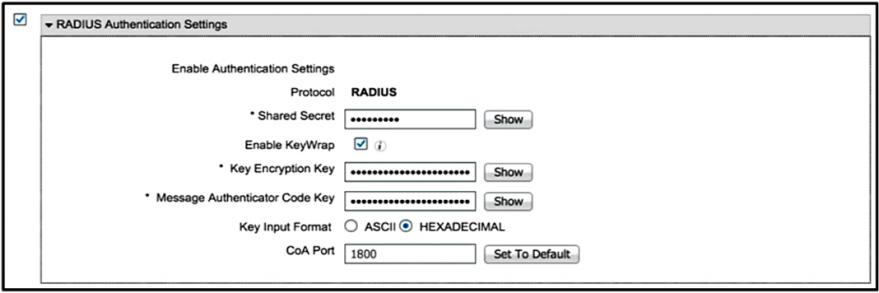
The security team has implemented ISE as an AAA solution for the wireless network. The
wireless engineer notices that though clients are able to authenticate successfully, the ISE
policies that are designed to place them on different interfaces are not working. Which
configuration must be applied in the RADIUS Authentication Settings section from the ISE
Network Device page?
A. Disable KeyWrap.
B. Use ASCII for the key input format.
C. Change the CoA Port.
D. Correct the shared secret.
Explanation:
The issue is that clients authenticate successfully, but ISE policies like dynamic VLAN assignment are not applied. This is a classic symptom of a Change of Authorization (CoA) communication failure. After successful 802.1X authentication, ISE uses a CoA request to push policy attributes (like a VLAN ID or downloadable ACL) to the Wireless LAN Controller. If the WLC does not receive or process this CoA, the client session remains in its initial state.
The most common cause of this is a port mismatch. The exhibit shows the CoA Port is set to 1800. However, Cisco's default CoA port for its devices is 1700 . A configuration using port 1800 would cause ISE to send CoA requests to a port the WLC is not listening on, effectively breaking dynamic policy enforcement.
Why the others are wrong:
A. Disable KeyWrap:
This is an optional RADIUS security setting. If misconfigured, it would likely break authentication entirely, which is not the case here.
B. Use ASCII for key input format:
This only changes how the shared secret is entered on the ISE page. It does not affect CoA functionality.
D. Correct the shared secret:
A shared secret mismatch would prevent all RADIUS communication, meaning clients would not authenticate successfully at all.
References:
Cisco ISE documentation: Default CoA port is 1700 for Cisco devices and 3799 for non-Cisco vendors .
Troubleshooting guides for mixed-vendor environments list CoA port mismatches as a primary cause of dynamic authorization failures .
| Page 9 out of 24 Pages |
| 56789101112 |
| 300-430 Practice Test Home |
Real-World Scenario Mastery: Our 300-430 practice exam don't just test definitions. They present you with the same complex, scenario-based problems you'll encounter on the actual exam.
Strategic Weakness Identification: Each practice session reveals exactly where you stand. Discover which domains need more attention, before Implementing Cisco Enterprise Wireless Networks (ENWLSI) exam day arrives.
Confidence Through Familiarity: There's no substitute for knowing what to expect. When you've worked through our comprehensive 300-430 practice exam questions pool covering all topics, the real exam feels like just another practice session.
Copyright © All Rights Reserved