
A corporation has a wireless network where all access points are configured in FlexConnect. The WLC has a Data WLAN and a VoWiFi WLAN implemented where centrally-switched is configured for the APs. Which QoS configuration must be implemented for the wireless packets to maintain the marking across the wired and wireless network?
A. Enable CAC
B. Trust DSCP
C. Set QoS to Platinum
D. Allow WMM
Explanation:
In this scenario, the APs are in FlexConnect mode but the WLANs are centrally switched – meaning all client traffic is tunneled via CAPWAP from the AP to the WLC before being forwarded to the wired network. For QoS markings to be preserved consistently across the wireless and wired infrastructure, the WLC must Trust DSCP.
When DSCP trust is enabled:
Upstream traffic (client → network): The WLC uses the DSCP value in the client's IP packet to mark the outer CAPWAP header. This ensures the packet enters the wired network with the correct Layer 3 marking for prioritization.
Downstream traffic (network → client): The WLC preserves the DSCP value from the wired network and maps it appropriately to the 802.11e UP (WMM) priority for wireless transmission.
Without DSCP trust, the WLC would rely on the 802.11e UP value from the client's wireless frame, which may not align with the desired DSCP marking, leading to incorrect prioritization across the network boundary. Trusting DSCP ensures end-to-end QoS consistency for both Data and VoWiFi traffic.
Why the others are wrong:
A. Enable CAC
– Call Admission Control is used to reserve bandwidth for voice calls and prevent oversubscription. It does not affect how packets are marked or preserved across the wired/wireless boundary.
C. Set QoS to Platinum
– While Platinum is the highest QoS level for voice traffic, setting the WLAN to a specific QoS level does not preserve the client's original DSCP marking. It would overwrite or ignore existing markings, breaking end-to-end consistency.
D. Allow WMM
– Wi-Fi Multimedia enables 802.11e QoS at the wireless layer but uses 802.11e UP values, not DSCP. Without DSCP trust, the WLC would use UP values for packet prioritization, which may not match the DSCP markings on the wired network.
References:
Cisco 300-430 ENWLSI Official Certification Guide – Chapter on QoS and Wired-to-Wireless Mapping.
Cisco Wireless Controller Configuration Guide – "Configuring QoS for Central Switching" and "Trust DSCP" settings.
During the EAP process and specifically related to the client authentication session, which encrypted key is sent from the RADIUS server to the access point?
A. WPA key
B. session key
C. encryption key
D. shared-secret key
Explanation:
In the EAP authentication process for a wireless network, the Access Point (AP) acts as an authenticator, relaying EAP messages between the client (supplicant) and the RADIUS authentication server.
The specific encrypted key sent from the RADIUS server to the AP upon successful authentication is the session key. This key is formally known as the Pairwise Master Key (PMK).
The process works as follows:
After the client and RADIUS server complete the EAP exchange (like PEAP or EAP-TLS), the authentication is successful.
The RADIUS server, encapsulating the key information in a RADIUS-Access Accept message, sends the session key (PMK) to the AP.
This PMK is then used as the foundation for the subsequent 4-Way Handshake. During this handshake, the AP and client derive the necessary encryption keys (PTK) and group keys (GTK) to secure the wireless data traffic.
Why the others are wrong:
A. WPA key:
"WPA key" is a generic term. The specific key transferred is the master session key (PMK), which is then used to derive other WPA keys like the PTK.
C. encryption key:
This is too vague. The key sent is the master session key (PMK), not the final encryption key (PTK) used directly for encrypting data frames. That is derived later by the AP and client.
D. shared-secret key:
This usually refers to the pre-shared key (PSK) for a personal WPA network, or the static shared secret used to authenticate communication between the WLC and the RADIUS server itself, not the key sent for a client's session.
References:
FreeRADIUS EAP documentation
Cisco Wireless Controller Security Guide (EAP Architecture)
IEEE 802.11i Key Management standards
What is configured to use more than one port on the OEAP to extend the wired network's?
A. AAA override
B. client load balancing
C. remote LAN ACL
D. remote LAN
Explanation:
The Remote LAN (RLAN) feature is specifically designed to securely extend a corporate wired network over an internet connection to a remote OfficeExtend AP (OEAP). The key to understanding this question is that the OEAP has multiple physical Ethernet ports. In its default state, only the yellow port (port 4) is configured as the single Remote LAN port to extend the network.
The "remote LAN" configuration itself is what allows this wired extension to happen. However, to utilize more than one physical port for this purpose (like ports 3 and 4 on an OEAP-600), the Dual RLAN Ports feature must be specifically enabled on the Wireless LAN Controller.
Here's how the configuration works for multiple ports:
Once the config network oeap-600 dual-rlan-ports enable command is run on the WLC, port 4 and port 3 can both be used as Remote LAN ports.
The specific VLAN assigned to each port depends on the Remote LAN ID. For example, an RLAN with an odd ID (like 3) maps to port 3, while an RLAN with an even ID (like 2) maps to port 4.
Why the others are wrong:
A. AAA override:
This feature allows a RADIUS server to return specific attributes (like a VLAN ID) for a wireless client, overriding the WLAN's default settings. It is unrelated to extending the wired network through the OEAP's physical ports.
B. Client load balancing:
This is a radio resource management feature used to distribute wireless clients evenly among access points. It does not impact the functionality or number of wired ports on an OEAP.
C. Remote LAN ACL:
While an Access Control List (ACL) can be applied to a Remote LAN for security and traffic filtering, the ACL itself is not the feature that allows the wired network extension to happen. The foundational feature is the Remote LAN configuration.
References:
Cisco Catalyst 9800 WLC OEAP and RLAN Configuration Guide
Cisco Aironet 600 Series OfficeExtend AP Configuration Guide
Refer to the exhibit.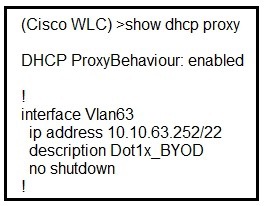
A network administrator deploys the DHCP profiler service in two ISE servers: 10.3.10.101
and 10.3.10.102. All BYOD devices connecting to WLAN on VLAN63 have been incorrectly
profiled and are assigned as unknown profiled endpoints. Which action efficiently rectifies
the issue according to Cisco recommendations?
A. Nothing needed to be added on the Cisco WLC or VLAN interface. The ISE configuration must be fixed.
B. Disable DHCP proxy on the Cisco WLC.
C. Disable DHCP proxy on the Cisco WLC and run the ip helper-address command under the VLAN interface to point to DHCP and the two ISE servers.
D. Keep DHCP proxy enabled on the Cisco WLC and define helper-address under the VLAN interface to point to the two ISE servers.
Explanation:
The root cause of the incorrect profiling is that the WLC's DHCP proxy feature is intercepting and modifying DHCP packets before they reach the ISE servers. While the show dhcp proxy output confirms DHCP proxy is enabled on the WLC, this setting prevents the ISE DHCP probe from receiving the original client DHCP data required for accurate device profiling.
Why the others are wrong:
A. Nothing needed on WLC—ISE config must be fixed:
Incorrect because the WLC's DHCP proxy actively blocks ISE from receiving DHCP client data. Without changing the WLC, ISE cannot profile the endpoints correctly regardless of ISE configuration.
B. Disable DHCP proxy only:
Incomplete because the DHCP server and ISE servers are not on the same Layer 2 network as the clients (VLAN 63 has a /22 subnet with gateway at .252). Disabling proxy without IP helpers would break DHCP as broadcasts cannot cross Layer 3 boundaries.
D. Keep DHCP proxy enabled and define helper-address:
Incorrect because DHCP proxy and DHCP bridging (IP helper) are mutually exclusive modes. When DHCP proxy is enabled, the WLC handles DHCP forwarding directly and does not bridge the original packets to the wired network for ISE to receive.
References:
Cisco "How-To: ISE Profiling Design Guide" – DHCP probe configuration for wireless devices
Cisco Support Article "Understand how AireOS WLCs Handle DHCP Protocol" – DHCP proxy vs. bridging modes
When implementing self-registration for guest/BYOD devices, what happens when an employee tries to connect four devices to the network at the same time?
A. The last device is removed and the newly added device is updated as active device.
B. The registration is allowed, but only one device is connected at any given time.
C. All devices are allowed on the network simultaneously.
D. Purge time dictates how long a device is registered to the portal
Explanation:
When implementing self-registration for guest/BYOD devices in a Cisco wireless environment (often using Cisco ISE and a sponsor/self-registration portal), there is typically a limit on the number of devices a single user account (employee) can register.
Once the user has reached the maximum number of allowed registered devices (for example, the default or configured limit is often 3 devices), the system must handle a new registration request.
In this scenario, when an employee tries to connect a fourth device, the self-registration portal will automatically replace the oldest or last active device. The last device (or sometimes the least recently used device, depending on configuration) is purged or removed from the active device list, and the newly added device is registered and updated as the active device.
Why the others are wrong:
B. The registration is allowed, but only one device is connected at any given time:
This describes a "single-device" policy where only one device can be active simultaneously. This is not standard for BYOD self-registration, which typically allows multiple concurrent connections.
C. All devices are allowed on the network simultaneously:
This would only be true if there was no limit on the number of devices per user. It is incorrect because the self-registration portal enforces a maximum device limit.
D. Purge time dictates how long a device is registered to the portal:
The "purge time" (or session timeout/endpoint aging) dictates how long an endpoint remains in the database after it has been inactive or how long the session lasts. The maximum device limit (or maximum registrations per user) is the configuration that dictates how many devices a single user can have registered at once.
References:
Cisco ISE Self-Registered Guest Portal Configuration Guide
Cisco ISE BYOD Portal Configuration Guide (Device Registration Policies)
Cisco ISE Administration Guide - Endpoint Management and Guest Services
Which devices can be tracked with the Cisco Context Aware Services?
A. wired and wireless devices
B. wireless devices
C. wired devices
D. Cisco certified wireless devices
Explanation:
Cisco Context Aware Services (CAS), running on the Mobility Services Engine (MSE), is designed to track a comprehensive range of endpoints across the entire network, including both wireless and wired devices.
Wireless Devices: This is the most commonly known function, where CAS tracks Wi-Fi clients, RFID asset tags, and rogue devices by analyzing signal strength data from access points.
Wired Devices: For wired endpoints, CAS tracks devices attached to "context-aware" Cisco Catalyst switches. It records the device's MAC address, IP address, and the specific switch port it connects to, effectively providing location context (e.g., civic address) through this wired attachment point.
Why the others are wrong:
B. wireless devices:
This is incorrect because the function extends to the wired network, not just wireless, as shown above.
C. wired devices:
Incorrect because it excludes the wireless clients and tags which are a primary focus of the service.
D. Cisco certified wireless devices:
Incorrect because the service tracks any Wi-Fi client and RFID tag that the network can detect, not just Cisco-certified devices.
References:
Cisco Context-Aware Services Design Guide – Details tracking for both WLAN controllers and Catalyst switches.
Cisco MSE and CAS Overview – Lists tracked elements including wireless clients, tags, and wired clients.
What is the default NMSP echo interval between Cisco MSE and a Wireless LAN Controller?
A. 10 seconds
B. 15 seconds
C. 30 seconds
D. 60 seconds
Explanation:
The Network Mobility Services Protocol (NMSP) is the communication protocol used between the Cisco Mobility Services Engine (MSE) and the Wireless LAN Controller (WLC). NMSP enables the exchange of location, presence, and radio resource management data for context-aware services. Within this protocol, the Echo Interval serves as a keepalive or heartbeat mechanism. It defines how frequently the MSE sends an NMSP echo request to the WLC to verify that the connection is active and healthy. If the WLC does not respond within a specified timeout, the MSE marks the connection as down and attempts to re-establish it.
According to Cisco's official documentation for Prime Infrastructure and the MSE, the default value for the NMSP Echo Interval is 15 seconds. The valid configurable range for this parameter is 1 to 120 seconds, but 15 seconds remains the factory default unless manually modified. This value is optimal for balancing timely failure detection with minimal network overhead.
Why the others are wrong:
A. 10 seconds:
This is a commonly mistaken value but is not the default NMSP Echo Interval. It may be confused with other timers such as the CAPWAP keepalive interval between APs and the WLC, which defaults to 10 seconds, but that is a separate protocol.
C. 30 seconds:
While 30 seconds is a configurable value, it is not the default. Some sources may confuse this with the NMSP attachment interval for wired devices (switch ports to MSE), which defaults to 30 seconds, but that applies to wired context-aware switches, not to the MSE-to-WLC echo interval.
D. 60 seconds:
This is not the default for the NMSP Echo Interval. It may be confused with other timers such as the RADIUS timeout or session timeout values, but it is unrelated to NMSP keepalive functionality.
References:
Cisco Prime Infrastructure 3.7 User Guide – "NMSP Parameters" section, which explicitly states the Echo Interval default is 15 seconds.
Cisco Mobility Services Engine Configuration Guide – NMSP protocol specifications and timer defaults.
Where is a Cisco OEAP enabled on a Cisco Catalyst 9800 Series Wireless Controller?
A. RF Profile
B. Flex Profile
C. Policy Profile
D. AP Join Profile
Explanation:
On the Cisco Catalyst 9800 Series Wireless Controller, the Flex Profile (FlexConnect Profile) is the configuration object that enables OEAP mode . The Flex Profile is the primary location where an administrator configures and enables the Office Extend AP feature for a FlexConnect AP .
The Flex Profile contains various settings for FlexConnect APs, including native VLAN ID, ACL policies, and the Office Extend AP toggle. When this toggle is enabled, the AP operates in OEAP mode, providing secure DTLS encryption and the ability to extend the corporate WLAN to a remote location via the internet . After creating and enabling the Flex Profile, it is mapped to a Site Tag, which then associates the profile with specific APs .
The combined use of a Flex Profile with the OEAP feature enabled and a Site Tag allows the AP to operate in FlexConnect mode as an OfficeExtend AP.
Why the others are wrong:
A. RF Profile:
RF Profiles are used to configure radio frequency settings such as transmit power, data rates, and channel assignments for APs operating in a specific RF environment. They do not contain OEAP configuration parameters.
C. Policy Profile:
Policy Profiles define WLAN-specific policies like VLAN mapping, QoS, and security settings. While they can enable split-tunneling for OEAP traffic , the OEAP mode itself is not enabled here.
D. AP Join Profile:
The AP Join Profile defines general AP parameters like SSH access, location, and link encryption . While it includes OEAP-related settings such as local-access, link-encryption, and rogue-detection , the primary OEAP mode enablement occurs within the Flex Profile. The AP Join Profile fine-tunes the behavior once the AP is in OEAP mode but does not activate the mode itself.
References:
Cisco Catalyst 9800 Series Configuration Guide – OEAP FlexConnect Profile configuration
Cisco Documentation – Configuring OEAP with Flex Profile and Site Tag
Exam 300-430 topic 1 question 5 discussion – OEAP configuration location
An engineer configures a Cisco Aironet 600 Series OfficeExtend AP for a user who works remotely. What is configured on the Cisco WLC to allow the user to print a printer on his home network?
A. split tunneling
B. SE-connect
C. FlexConnect
D. AP failover priority
Explanation:
A Cisco OfficeExtend AP (OEAP) extends the corporate WLAN to a remote location via a secure CAPWAP tunnel back to the Wireless LAN Controller . By default, all client traffic from the OEAP is tunneled centrally to the corporate network. This means local home network devices, such as a printer, become unreachable.
The Split Tunneling feature resolves this by intelligently directing traffic . It uses ACLs to classify traffic based on packet content . Traffic destined for the corporate network is sent through the secure tunnel to the WLC, while traffic destined for the home network (like a print job) is "split" off and switched locally at the AP . This feature must be enabled on the WLC and applied to the specific WLAN or Remote LAN the user is connected to .
Why the others are wrong:
B. SE-connect:
This mode configures an AP as a dedicated spectrum analyzer for RF interference detection, not for traffic management.
C. FlexConnect:
While OEAPs operate in FlexConnect mode , this term describes the AP's operational capability. FlexConnect does not automatically enable local access; the split tunnel policy must be explicitly configured on the WLAN.
D. AP failover priority:
This is a high-availability feature that determines backup controller connections. It is unrelated to traffic forwarding or local network access.
References
Cisco Catalyst 9800 Series Configuration Guide – OEAP Split Tunneling configuration .
Cisco 300-430 ENWLSI Official Certification Guide – Chapter on FlexConnect and OEAP.
An engineer must configure a Cisco WLC to support Cisco Aironet 600 Series OfficeExtend APs. Which two Layer 2 security options are supported in this environment? (Choose two.)
A. Static WEP + 802.1X
B. WPA+WPA2
C. Static WEP
D. CKIP
E. 802.1X
Explanation:
WPA+WPA2 (Option B):
Cisco Aironet 600 Series OfficeExtend APs (OEAPs) natively support WPA and WPA2 enterprise/personal encryption modes. WPA2 with AES encryption is the standard Layer 2 security mechanism used to secure corporate WLAN SSIDs broadcasted remotely at employee home offices.
802.1X (Option E):
802.1X enterprise authentication (using EAP methods like PEAP, EAP-FAST, or EAP-TLS) is fully supported over OEAP deployments for secure user and device level authentication. The 802.1X payload is tunneled back securely over CAPWAP to the centralized WLC and RADIUS infrastructure.
Why Other Options Are Incorrect:
A. Static WEP + 802.1X:
Combining static WEP keys with 802.1X framework is a legacy/non-standard deployment mode that is not supported on OEAP models.
C. Static WEP:
While legacy WLC code permitted Static WEP with restrictions (disabling 802.11n speeds), it is a deprecated and heavily insecure protocol that is not recommended or primary in ENWLSI exam profiles compared to 802.1X and WPA/WPA2.
D. CKIP:
Cisco Key Integrity Protocol (CKIP) is an obsolete, Cisco-proprietary TKIP precursor designed for early legacy hardware. It is unsupported on the 600 Series OEAP platform.
References:
Cisco Aironet 600 Series OfficeExtend Access Point Data Sheet: Lists native support for 802.11i, WPA, WPA2, 802.1X authentication framework, and AES/TKIP encryption.
Cisco Wireless LAN Controller Configuration Guide: Outlines supported WLAN Layer 2 security modes for OEAP endpoints, specifically highlighting WPA/WPA2 and 802.1X EAP protocols.
A corporation has recently implemented a BYOD policy at their HQ. Which two risks should the security director be concerned about? (Choose two.)
A. network analyzers
B. malware
C. lost and stolen devices
D. keyloggers
E. unauthorized users
Explanation:
Malware Risks (Option B):
In Bring Your Own Device (BYOD) environments, personal smartphones, tablets, and laptops lack strict corporate software controls. Users may download unverified applications, visit un-scrubbed sites, or fail to keep their operating systems patched. If an infected personal device connects to the corporate wireless network, it can introduce malware that propagates across internal subnets.
Lost and Stolen Devices (Option C):
Personal mobile devices leave corporate premises regularly and are highly vulnerable to physical theft or loss. If a device contains saved corporate credentials, active session tokens, sensitive email caches, or corporate certificates—and lacks Mobile Device Management (MDM) remote-wipe capabilities—a stolen device poses a direct path for unauthorized data exposure and credential compromise.
Why Other Options Are Incorrect
A. network analyzers:
Packet capture tools and network analyzers monitor raw wireless or wired frames. While a rogue device can run sniffing software, enterprise wireless infrastructure mitigates this through WPA2/WPA3-Enterprise encryption, which generates unique per-user pairwise keys (PTK) that prevent unauthorized users from eavesdropping on other clients' traffic.
D. keyloggers:
While software or hardware keyloggers are a endpoint security threat, they are an OS-level/endpoint threat rather than a risk inherent to the deployment of a BYOD WLAN architecture.
E. unauthorized users:
In a properly implemented Cisco BYOD architecture (utilizing Cisco ISE, Onboarding Portals, 802.1X, and EAP-TLS digital certificates), unauthorized users are authenticated and denied access at the network edge before gaining corporate access.
References
Cisco BYOD Design Guide / ISE Onboarding: Identifies device loss/theft and non-compliant unmanaged endpoints carrying malicious code/malware as the primary security risks associated with personal devices accessing enterprise LAN/WLAN assets.
An engineer must create an account to log in to the CLI of an access point for troubleshooting. Which configuration on the WLC will accomplish this?
A. ReadWrite User Access Mode
B. Global Configuration Enable Password
C. SNMP V3 User
D. Allow New Telnet Sessions
https://www.cisco.com/c/en/us/td/docs/wireless/controller/7-
4/configuration/guides/consolidated/b_cg74_CONSOLIDATED/b_cg74_CONSOLIDATED_
chapter_01101011.html
Explanation:
To create a local management account for logging into an access point's CLI, the Wireless LAN Controller (WLC) uses the config mgmtuser add command. The critical element for granting full troubleshooting capability is setting the user's access mode to read-write . This creates a user account with the necessary privileges to execute debug and configuration commands .
Why the others are wrong:
B. Global Configuration Enable Password:
This sets the privileged EXEC (enable) password for access points but does not create a user account with a username and password for login. It is a separate security credential for entering privileged mode after initial login.
C. SNMP V3 User:
This is used for network management protocols like SNMP polling and trap receiving, not for interactive CLI or console access to an AP. A user account for CLI access is distinct from an SNMPv3 user profile .
D. Allow New Telnet Sessions:
This feature simply enables or disables the Telnet service on the controller itself. It does not manage user credentials or their assigned privileges for AP access .
References:
Cisco Wireless Controller Command Reference – config mgmtuser add syntax
Cisco Wireless Controller Configuration Guide – Local Management User configuration
Cisco WLC Configuration Guide – Global Credentials for Access Points
| Page 2 out of 24 Pages |
| 12345678 |
| 300-430 Practice Test Home |
Real-World Scenario Mastery: Our 300-430 practice exam don't just test definitions. They present you with the same complex, scenario-based problems you'll encounter on the actual exam.
Strategic Weakness Identification: Each practice session reveals exactly where you stand. Discover which domains need more attention, before Implementing Cisco Enterprise Wireless Networks (ENWLSI) exam day arrives.
Confidence Through Familiarity: There's no substitute for knowing what to expect. When you've worked through our comprehensive 300-430 practice exam questions pool covering all topics, the real exam feels like just another practice session.
Copyright © All Rights Reserved