
A customer must provide a secure wireless network from a Cisco Catalyst 9800 Series Wireless Controller to a Cisco AP to remote users The corporate WLAN must be provided over the Internet to specific locations and support a locally-installed IP phone Which two actions accomplish this configuration? (Choose two )
A. Configure NAT on the physical interface
B. Enable Local Switching under the WLAN
C. Create a Flex Group and add the AP
D. Enable Office Extend AP on the Flex Profile.
E. Configure Remote LAN under the Remote LAN
Explanation:
To provide a secure corporate WLAN over the Internet to remote users using a Cisco Catalyst 9800 Wireless Controller, you need to configure the AP to operate in OfficeExtend (OEAP) mode. This mode uses FlexConnect technology with specific enhancements for remote deployment.
Create a Flex Group and add the AP (Option C):
The remote AP must be part of a FlexConnect group to share configuration and enable local switching capabilities. The Flex Group contains the APs that will operate as OEAPs and allows them to share settings like VLANs and ACLs.
Enable Office Extend AP on the Flex Profile (Option D):
OfficeExtend mode is enabled within the Flex Profile on the Catalyst 9800. This profile contains the OEAP-specific settings, such as enabling the OEAP feature, configuring DTLS encryption, and setting up split tunneling. This step is mandatory to activate the OEAP functionality.
Why the others are wrong:
A. Configure NAT on the physical interface:
NAT is not configured on the WLC for OEAP. The AP typically resides behind a home router that performs NAT. The OEAP establishes a CAPWAP tunnel through NAT without requiring NAT configuration on the WLC.
B. Enable Local Switching under the WLAN:
While local switching is used in OEAP deployments to offload traffic locally, the OEAP mode is not enabled directly on the WLAN. It is enabled within the Flex Profile. Local switching is a separate configuration applied to the WLAN.
E. Configure Remote LAN under the Remote LAN:
Remote LAN (RLAN) is a feature for extending wired connectivity through an OEAP, not the primary method for enabling the OEAP mode itself. The RLAN is configured under the Flex Profile or Policy Profile, not under a separate "Remote LAN" menu.
References:
Cisco Catalyst 9800 Series Wireless Controller Configuration Guide – OEAP and FlexConnect Profile configuration.
Cisco 300-430 ENWLSI Official Certification Guide – Chapter on OfficeExtend APs.
What are two considerations when deploying a Cisco Hyperlocation? (Choose two.)
A. NTP configuration is available, but not recommended.
B. The Cisco Hyperlocation feature must be enabled only on the wireless LAN controller.
C. After enabling Cisco Hyperlocation on Cisco CMX, the APs and the wireless LAN controller must be restarted.
D. The Cisco Hyperlocation feature must be enabled on the wireless LAN controller and Cisco CMX.
E. If the Cisco CMX server is a VM, a high-end VM is needed for Cisco Hyperlocation deployments.
Explanation:
Dual System Enabling Requirement (Option D):
Cisco Hyperlocation requires functional enablement across both network control and analytics engines. The feature must be enabled on the Wireless LAN Controller (WLC) so access points collect Angle of Arrival (AoA) and BLE metrics, and it must be enabled on Cisco CMX under system location settings to process and render location coordinates.
High-End Virtual Machine Resource Sizing (Option E):
Processing high-density AoA calculations and real-time FastLocate data streams places significant compute demands on Cisco CMX. Cisco specifies that virtualized CMX instances deploying Hyperlocation require a High-End VM template (typically 16–20 vCPUs, 32–64 GB RAM, and 500 GB+ disk storage).
Why Other Options Are Incorrect:
A. NTP configuration is available, but not recommended:
NTP synchronization is mandatory across the WLC, CMX, and APs to ensure accurate timestamping for location calculations.
B. The Cisco Hyperlocation feature must be enabled only on the wireless LAN controller:
Enabling Hyperlocation on the WLC alone is insufficient; CMX must also have Hyperlocation enabled to process raw signal data.
C. After enabling Cisco Hyperlocation on Cisco CMX, the APs and the wireless LAN controller must be restarted:
Enabling Hyperlocation requires restarting the CMX services (cmxctl restart) and the Access Points, but the WLC itself does not require a reboot.
References:
Cisco AP4800 Hyperlocation Deployment Guide: Specifies that Hyperlocation requires configuration on both WLC and CMX, mandating a High-End CMX VM deployment profile to handle system processing.
Cisco Wireless LAN Controller Configuration Guide (Hyperlocation): Details required steps for enabling Hyperlocation profiles across controllers and CMX engines.
An engineer has implemented 802.1x authentication on the wireless network utilizing the internal database of a RADIUS server. Some clients reported that they are unable to connect. After troubleshooting, it is found that PEAP authentication is failing. A debug showed the server is sending an Access- Reject message. Which action must be taken to resolve authentication?
A. Use the user password that is configured on the server.
B. Disable the server certificate to be validated on the client.
C. Update the client certificate to match the user account.
D. Replace the client certificates from the CA with the server certificate.
Explanation:
The issue is specific to PEAP authentication, which is a password-based EAP method. Since the RADIUS server is using its internal database for authentication, the users must have their credentials correctly set up there.
The debug output showing an Access-Reject message indicates the server denied the client's request, which is often caused by a simple credential mismatch. In PEAP, the client sends the user's password in a secure tunnel to the server for validation. If the password provided by the client does not match the one configured for that user in the internal database, the server will send an Access-Reject. Therefore, the solution is to ensure the client is using the correct username and password.
Why the others are wrong:
B. Disable the server certificate to be validated on the client:
This is a drastic and insecure step. While a certificate issue could cause the TLS tunnel to fail (resulting in an "Access-Challenge" or a timeout), it would not typically result in a clear "Access-Reject" message. The error shown indicates the authentication itself failed, not the certificate trust.
C. Update the client certificate to match the user account:
PEAP does not require a client certificate. It relies on the username and password for authentication. This would be relevant for EAP-TLS, not PEAP.
D. Replace the client certificates from the CA with the server certificate:This is also not relevant to PEAP, as client certificates are not used in the standard PEAP flow.
References:
Cisco Secure Network Server troubleshooting documentation: Internal user database and password mismatch.
The debug message "Access-Reject" is typically related to user credentials.
Refer to the exhibit.
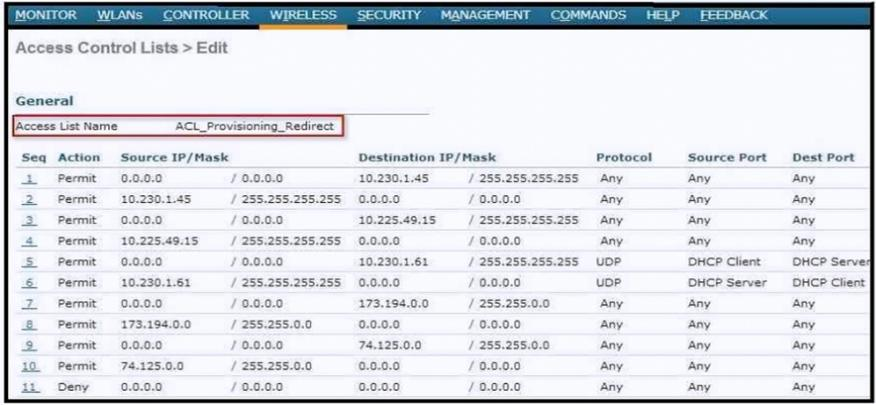
An ACL is configured to restrict access for BYOD clients. The ACL must redirect devices to
the guest portal. To which two devices on the local network must the ACL allow access
other than the DHCP server? (Choose two.)
A. RADIUS server
B. DNS server
C. Cisco ISE
D. SNMP server
E. WLC
Explanation:
When redirecting unauthenticated or onboarding BYOD clients to a web portal (such as Cisco Central Web Authentication or a guest portal), the Pre-Authentication / Redirect Access Control List (ACL) must permit specific infrastructure services while blocking general traffic:
DNS Server (Option B):
BYOD client devices resolve the Fully Qualified Domain Name (FQDN) of the portal page (e.g., ise-node.example.com) via DNS before navigating to it. If DNS (UDP/TCP port 53) is blocked in the redirect ACL, the client cannot perform name resolution, preventing HTTP/HTTPS redirection.
Cisco ISE (Option C):
Cisco Identity Services Engine hosts the portal webpage, process authentication flows, and handles onboarding certificates. The ACL must explicitly permit traffic destination IPs/ports destined for Cisco ISE (such as TCP 8443 for web portals) so the client can render the portal page and submit credentials.
Why Other Options Are Incorrect:
A. RADIUS server:
Wireless client devices never communicate directly with a RADIUS server over the local network; the Wireless LAN Controller (WLC) acts as the RADIUS client/NAS and proxies authentication messages to the RADIUS server behind the scenes.
D. SNMP server:
Simple Network Management Protocol is an administrative management protocol used between controllers and management platforms; client devices do not interact with SNMP servers during portal redirection.
E. WLC:
While the WLC intercepts the client's HTTP/HTTPS traffic to trigger the redirect URL, the client connects directly to the guest portal server (Cisco ISE) to complete web authentication rather than accessing WLC management interfaces.
References:
Cisco ISE Guest Access Deployment Guide: Outlines pre-authentication redirect ACL requirements, specifying explicit permit statements for DHCP, DNS, and Cisco ISE portal IP addresses prior to the deny statement that triggers redirection.
An engineer must configure MSE to provide guests access using social media authentication. Which service does the engineer configure so that guests use Facebook credentials to authenticate?
A. Social Connect
B. Client Connect
C. Visitor Connect
D. Guest Connect
Explanation:
To provide guest access using social media authentication (like Facebook credentials) on a Mobility Services Engine (MSE), you need to configure the Visitor Connect service.
The Cisco CMX documentation confirms that the Visitor Connect module is the guest access solution designed to provide a customizable captive portal. It explicitly supports social authentication plug-ins for Facebook, LinkedIn, and Google+ . This aligns perfectly with the scenario of allowing guests to use their Facebook credentials to authenticate.
Configuration details further clarify this: the process involves creating a Social Connector within the Visitor Connect settings, where the engineer enters the application ID and secret key obtained from the social network provider .
Why the others are wrong:
A. Social Connect:
While this is not a standard term for a CMX service, the social connector is the specific component within Visitor Connect used to configure the credentials .
B. Client Connect and D. Guest Connect:
These are not the names of the specific CMX service responsible for guest access with social authentication. Visitor Connect is the designated module for this functionality.
References
Cisco CMX Configuration Guide – Configuring Social Connectors is done under Visitor Connect > Social Connector .
An engineer has eight WLCs in a mobility group and must reduce the bandwidth consumed. Which two configuration items achieve this result? (Choose two.)
A. global symmetric mobility messaging
B. global multicast mode
C. mobility group unicast messaging
D. global unicast messaging
E. mobility group multicast messaging
Explanation:
An engineer with eight WLCs in a mobility group can reduce bandwidth consumption by enabling multicast for general operations and specifically for mobility group communication. By default, controllers send individual copies of data to each destination, which creates significant bandwidth overhead.
Global Multicast Mode (A):
Enabling this feature on the controller optimizes the delivery of multicast data by sending a single copy of multicast traffic to a CAPWAP multicast group address, rather than sending one copy to each individual AP . This efficiently reduces the bandwidth used for forwarding multicast streams across the network.
Mobility Group Multicast Messaging (D):
This feature ensures that WLCs exchange mobility information efficiently, using a single multicast message to reach all group members instead of sending individual unicast messages to each WLC. For a group of eight controllers, this significantly reduces the control traffic on the network .
Why the others are wrong
B. mobility group unicast messaging & C. global unicast messaging:
These are less efficient defaults that increase bandwidth usage since messages are sent individually to each WLC, creating multiple copies of the same information .
E. global symmetric mobility messaging:
This relates to client mobility between controllers but does not directly impact bandwidth optimization .
References
Exam discussion and Cisco documentation confirm enabling multicast mode for bandwidth optimization
Cisco WLC multicast mode is managed under global configuration settings
After receiving an alert about a rogue AP, a network engineer logs into Cisco Prime Infrastructure and looks at the floor map where the AP that detected the rogue is located. The map is synchronized with a mobility services engine that determines that the rogue device is actually inside the campus. The engineer determines that the rogue is a security threat and decides to stop if from broadcasting inside the enterprise wireless network. What is the fastest way to disable the rogue?
A. Go to the location where the rogue device is indicated to be and disable the power.
B. Create an SSID similar to the rogue to disable clients from connecting to it.
C. Update the status of the rogue in Cisco Prime Infrastructure to contained.
D. Classify the rogue as malicious in Cisco Prime Infrastructure.
Explanation
The fastest way to disable a rogue AP from the Cisco Prime Infrastructure interface is to classify it as malicious. When an AP is classified as malicious, Prime Infrastructure can automatically trigger containment (if auto-containment is enabled) or allows the engineer to manually contain it with a single action. This is the quickest method to stop the rogue from broadcasting, as it directly initiates the mitigation process through the management platform without requiring physical intervention or complex configurations.
Once classified as malicious, Prime Infrastructure can instruct managed APs to send deauthentication frames to the rogue device, effectively disabling its ability to communicate with clients. This process is immediate and can be performed remotely from the Prime Infrastructure dashboard.
Why the others are wrong
A. Go to the location where the rogue device is indicated and disable the power:
This is a physical, time-consuming process that requires locating the device and manually disconnecting it. It is not the fastest method and may not be feasible if the rogue is hidden or in an inaccessible area.
B. Create an SSID similar to the rogue to disable clients from connecting:
This is not a valid mitigation technique. Creating a competing SSID does not disable the rogue; it only adds more RF interference and confusion without stopping the rogue AP's operation.
C. Update the status of the rogue in Cisco Prime Infrastructure to contained:
"Contained" is a state that results from containment, not an action you can directly select. The engineer must initiate containment (e.g., by classifying as malicious or using the containment command) to achieve this state.
References
Cisco Prime Infrastructure User Guide – Rogue AP Detection and Mitigation.
Cisco 300-430 ENWLSI Official Certification Guide – Chapter on Rogue AP Management.
An IT department receives a report of a stolen laptop and has information on the MAC address of the laptop. Which two settings must be set on the wireless infrastructure to determine its location? (Choose two.)
A. Location History for Clients must be enabled on the MSE.
B. Client location tracking must be enabled on the MSE.
C. Location History for Visitors must be enabled on the MSE.
D. Location History for Rogue APs & Rogue Clients must be enabled on the MSE.
E. Tracking optimization must be enabled on the WLC.
Explanation:
B. Client location tracking must be enabled on the MSE.
This is the foundational requirement. The Mobility Services Engine (MSE) is the core component responsible for collecting and processing location data from the wireless infrastructure. Without enabling this service, the MSE will not track any client locations .
A. Location History for Clients must be enabled on the MSE.
Enabling client location tracking gives you the device's current location. However, to search for a device that may have moved, you need its historical location data. This is often necessary to see the movement path of a stolen device. For example, you can search for a client by IP or MAC address and view its location history in the Prime Infrastructure interface .
❌ Why the Other Options Are Incorrect:
C. Location History for Visitors must be enabled on the MSE.
This setting pertains to guest users, not to all clients (which would include a corporate laptop).
D. Location History for Rogue APs & Rogue Clients must be enabled on the MSE.
A stolen laptop is a legitimate, known client on your network. This setting is for tracking unauthorized or potentially malicious devices, not your own endpoint.
E. Tracking optimization must be enabled on the WLC.
While the WLC provides the data, location tracking and history are functions of the MSE itself. The prerequisite for MSE-based tracking is that the controller is defined to Prime Infrastructure and synchronized with the MSE . There is no separate "tracking optimization" toggle that needs to be enabled on the WLC for this specific client location search.
References:
Cisco documentation confirms that clients detected by MSE can be searched and their location history viewed .
Cisco MSE configuration guides define the client location tracking capabilities as a core service of the MSE .
An organization is concerned about site-specific 802.1X authentication in the event of a WAN outage in their Cisco FlexConnect deployment. Which data is needed to accomplish this authentication?
A. local TACACS server shared secret
B. central RADIUS server shared secret
C. central TACACS server shared secret
D. local RADIUS server shared secret
Explanation:
To maintain 802.1X authentication during a WAN outage in a FlexConnect deployment, the AP must authenticate clients locally using a built-in EAP server . This requires a local RADIUS server shared secret to secure communication between the AP and its local RADIUS authentication service . When the WAN link to the central WLC fails, the FlexConnect AP enters standalone mode and authenticates clients independently without forwarding requests to the central controller . This reduces round-trip latency and removes dependence on WAN bandwidth . The configuration involves enabling local authentication on the FlexConnect group and assigning the RADIUS server group name under the flex profile .
Why the others are wrong:
A. local TACACS server shared secret:
TACACS+ is used for device administration (logging into the WLC), not for authenticating wireless clients.
B. central RADIUS server shared secret & C. central TACACS server shared secret:
Both involve central servers unreachable during a WAN outage. Local authentication bypasses central communication entirely .
References
Cisco Catalyst 9800 FlexConnect Configuration Guide: local authentication requires configuring local-auth radius-server-group
Cisco FlexConnect Deployment Guide: APs in standalone mode use backup RADIUS server for 802.1X EAP authentication
An engineer is defining a new Cisco AVC profile with different rules for HR and VIP users. Both user types connect to a single SSID and authenticate by using their Active Directory credentials via a Cisco ISE The engineer wants to apply the AVC profile dynamically to the user types Which Cisco AV pair attribute must be applied to the Cisco ISE?
A. role-name-avc
B. avc-protile-name
C. policy-role-avc
D. policy-avc-role
Explanation:
To apply an AVC (Application Visibility and Control) profile dynamically to different user types from Cisco ISE, the correct RADIUS attribute is the avc-profile-name Cisco AV pair.
The process works as follows:
On the Cisco WLC, you create separate AVC profiles for your HR and VIP users.
In Cisco ISE, you create authorization policies that match each user group (based on Active Directory attributes).
For each policy, you add a RADIUS attribute with the name avc-profile-name and the value set to the name of the corresponding AVC profile configured on the WLC.
When a user authenticates, ISE returns this attribute in the Access-Accept message, and the WLC applies the specified AVC profile to that user's traffic dynamically.
The official Cisco documentation confirms this: "The AAA AVC Profile is defined as a Cisco AV Pair. The string is defined as avc-profile-name and this has to be configured for any AVC profile existing on the WLC". This AAA override capability was introduced in release 8.0, enabling different clients on the same WLAN to receive different AVC profiles based on their authentication results.
Why the others are wrong:
A. role-name-avc:
This is not a recognized Cisco AV pair attribute for AVC profile assignment.
C. policy-role-avc and D. policy-avc-role:
These are not recognized Cisco RADIUS attributes for AVC profile assignment.
References
Cisco Application Visibility and Control Feature Deployment Guide: AAA AVC Profile Override configuration
Cisco Wireless Controller Command Reference: avc-profile-name attribute definition
Refer to the exhibit.
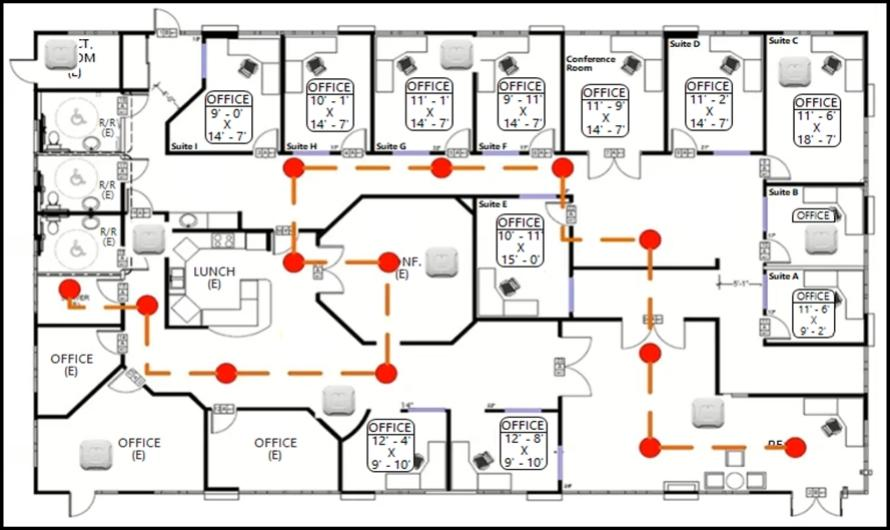
An engineer needs to configure location services in an office. The requirement is to use FastLocate and achieve higher locations refresh rates. Which location-based technique
should be implemented?
A. probe-based
B. location patterning
C. data packet-based
D. angulation
Explanation:
The requirement is to use FastLocate to achieve higher location refresh rates. Traditional Wi-Fi location tracking relies on probe requests sent by mobile devices, but their frequency varies and can be slow, leading to fewer data points . To overcome this, FastLocate collects Received Signal Strength Indication (RSSI) or location information from data packets that Access Points receive, which are more frequent . Therefore, the technique to implement is data packet-based location tracking.
Why the Others Are Wrong
A. probe-based:
This is the traditional, slower method that FastLocate was designed to improve upon .
B. location patterning:
This is not a standard or recognized location-based technique in Cisco's wireless location services.
D. angulation:
While "angulation" relates to Angle-of-Arrival (AoA) techniques like Hyperlocation, FastLocate specifically relies on using data packets from clients, not AoA, which is a different method for improved accuracy .
References:
Cisco CMX FastLocate Deployment Guide
Cisco Catalyst 9800 Series Wireless Controller Configuration Guide
An engineer is configuring location services within Cisco Spaces (formerly Cisco DNA Spaces). The solution must track interfering devices. Which component of Cisco Spaces must be configured?
A. Proximity Reporting
B. Detect and Locate
C. Cisco DNA Spaces SDK
D. Location Analytics
Explanation:
To track interfering devices (interferers) within Cisco Spaces, you must configure the Detect and Locate application. This app provides the core functionality for visualizing and tracking Wi-Fi devices, specifically enabling the tracking of interferers in your network .
From the Configure > Tracking menu within this application, you can specifically enable or disable the tracking of device types, including Interferers . This configuration allows the system to detect and provide the current and historic location of these devices .
Why the others are wrong
A. Proximity Reporting:
This app helps generate reports for contact tracing and is not the primary service for tracking interfering devices .
C. Cisco Spaces SDK:
This is a software development kit for building custom applications and third-party integrations, not for directly configuring interferer tracking .
D. Location Analytics:
This app is a separate service focused on providing insights and behavior metrics (e.g., occupancy, dwell time) from location data, rather than the fundamental configuration of tracking features like interferers .
References
Cisco Spaces Documentation: Detect and Locate app enables you to enable or disable the tracking of device types, including Interferers, from the Configure > Tracking menu .
Cisco Spaces app description: Location Analytics is for viewing reports of visits, while Detect and Locate is for viewing current and historic location of Wi-Fi devices .
| Page 10 out of 24 Pages |
| 678910111213 |
| 300-430 Practice Test Home |
Real-World Scenario Mastery: Our 300-430 practice exam don't just test definitions. They present you with the same complex, scenario-based problems you'll encounter on the actual exam.
Strategic Weakness Identification: Each practice session reveals exactly where you stand. Discover which domains need more attention, before Implementing Cisco Enterprise Wireless Networks (ENWLSI) exam day arrives.
Confidence Through Familiarity: There's no substitute for knowing what to expect. When you've worked through our comprehensive 300-430 practice exam questions pool covering all topics, the real exam feels like just another practice session.
Copyright © All Rights Reserved