
Topic 3: Exam Pool C
An IT manager is evaluating ticket resolution times. While reviewing the data, the manager notices repetitive issues are taking longer than expected to resolve. Which of the following changes should the manager implement to resolve repetitive issues more quickly?
A. Require the technicians to spend more time testing theories to determine the root causes of issues.
B. Require the technicians to verify full system functionality when resolving issues
C. Require the technicians to gather more information when speaking with users about issues.
D. Require the technicians to document the findings, action, and outcomes of issues.
Explanation: By documenting the findings, action, and outcomes of issues, the technicians can create a knowledge base that can be used to resolve similar issues in the future more quickly and efficiently. The documentation can also help identify patterns or trends that can lead to preventive measures or root cause analysis. Documenting the issues can also improve communication and collaboration among technicians and users, as well as provide evidence of service quality and performance.
A customer called the help desk to request information about how to increase the volume on a laptop using only a keyboard. Which of the following keys would MOST likely allow this to be done?
A. Alt
B. Fn
C. Tab
D. Ctrl
Explanation: To increase the volume on a laptop using only a keyboard, a user can press and hold down the Fn key while pressing one of the function keys (usually F1-F12) that has an icon representing volume up.
A technician is diagnosing several device issues reported by employees. INSTRUCTIONS
Click on each device to review the issue. Then select the appropriate issue and solution from the drop-down menu. Each option may be used more than once.
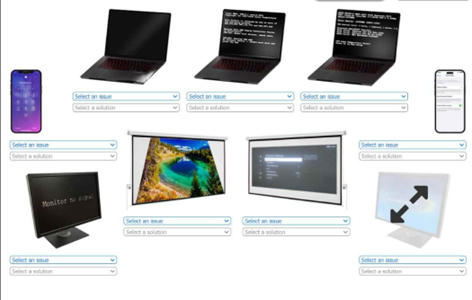
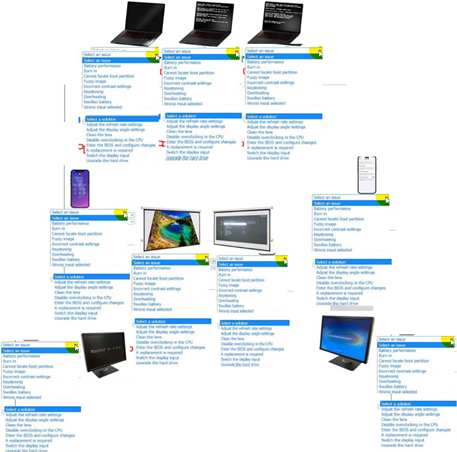
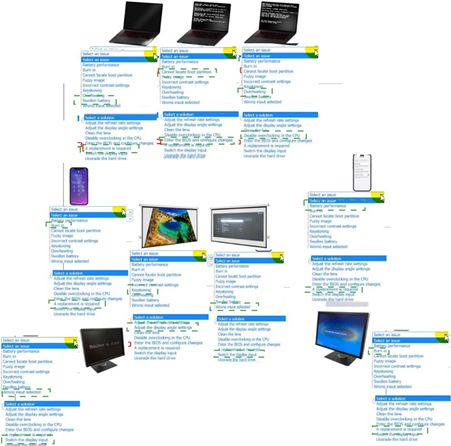
A user receives the following error when trying to reboot a computer:

A. Corrupted bootloader
B. Faulty RAID controller
C. Failed hard drive
D. Incorrect storage device driver
Explanation: The error message "Reboot and Select Proper Boot Device" indicates that the computer cannot find the boot device that contains the operating system12. This can happen if the hard drive that stores the operating system is damaged or failed, and the BIOS cannot detect it or read from it23. A failed hard drive can also cause other symptoms such as clicking noises, corrupted files, or slow performance4.
An end user needs to upgrade the hard drive on a laptop and wants one that is fast and shock resistant. Which of the following is the BEST option for this end user?
A. Hybrid HHD/SSD
B. 5,400rpm HDD
C. 7,200rpm HDD
D. NVMe SDD
Explanation: A non-volatile memory express (NVMe) solid state drive (SSD) is the best option for an end user who wants to upgrade the hard drive on a laptop and wants one that is fast and shock resistant.NVMe SSDs use flash memory and PCIe interface to achieve high performance and low latency.SSDs are also more shock resistant than hard disk drives (HDDs) because they have no moving parts.Hybrid HDD/SSD combines both technologies but does not offer the same speed or capacity as pure SSDs.A 5,400rpm HDD or a 7,200rpm HDD are slower and less shock resistant than SSDs.
A user tries to connect a monitor to a laptop to have an additional screen for work, but both screens show the same content. Which of the following should the user do to resolve the issue?
A. Use the Add New Hardware assistant to add the monitor and set up the required settings.
B. Purchase a docking station to connect both the laptop and the monitor.
C. Configure the Windows tiling feature to display multiple windows.
D. Go to the Display settings and configure the external monitor as extended.
Explanation: Configuring the monitor as an "extended" display will allow the laptop and monitor to show different content. By default, laptops mirror displays, so this setting change enables dual display functionality. This is covered under CompTIA Core 1 exam objectives for managing display configurations and settings.
A small company wants the ability to print in full color but needs to pay a minimal initial purchase price for the printer Which of the following is the best option?
A. Thermal printer
B. Inkjet printer
C. Dot matrix printer
D. Laser printer
Explanation: Inkjet printers are the best choice for a small company seeking full-color printing with a minimal initial cost. While they have higher operating costs (due to ink), they are affordable and capable of high-quality color output.
✑ Why Not A (Thermal printer): Thermal printers are not designed for color printing
and are typically used for labels or receipts.
✑ Why Not C (Dot matrix printer): Dot matrix printers are outdated, noisy, and do not support full-color printing.
✑ Why Not D (Laser printer): Laser printers have lower running costs but a higher initial purchase price, especially for color models.
CompTIA A+ Exam Reference: Core 2 (220-1102), Section 4.6, printer types.
Which of the following components enables finger-based screen input for two-in-one laptops?
A. Fingerprint scanner
B. Digitizer
C. Stylus
D. Inverter
Explanation: A digitizer is the component in a two-in-one laptop that enables finger-based or stylus input on the screen. It is responsible for converting touch inputs into digital signals that the device can interpret.
✑ Why Digitizer?
✑ Incorrect Options:
CompTIA A+ Exam Objectives References:
✑ 220-1101 (Core 1), Section 1.2 and 1.3: Covers mobile device components, including digitizers and input methods.
A user reports that a computer has a virus on it. Which of the following is the FIRST step the technician should take?
A. Determine a plan of action to resolve the problem
B. Run antivirus software to remove the virus from the computer
C. Ask the user about the symptoms the computer is experiencing
D. Make a backup of the user's data on an external drive.
Explanation: Asking the user about the symptoms the computer is experiencing is the first step the technician should take when a user reports that a computer has a virus on it. This step helps the technician to gather information and identify the problem before determining a plan of action to resolve it. Running antivirus software, making a backup of the user’s data, or determining a plan of action are not the first steps, but possible actions that can be taken after identifying the problem.
A technician is installing multiple plain old telephone service lines for a client. Which of the following tools should the technician use to attach the cables? (Select two).
A. Punchdown tool
B. Multimeter
C. Toner probe
D. Wi-Fi analyzer
E. Loopback plug
F. Network tap
Explanation: A punchdown tool is essential for connecting telephone wires to patch panels, keystone modules, and punchdown blocks, making it a critical tool for installing plain old telephone service (POTS) lines. A toner probe, on the other hand, is used for tracing and identifying specific wires within a bundle, facilitating the correct attachment of telephone lines to their respective terminals. These tools are fundamental for ensuring proper and efficient installation of POTS lines in a client's environment.
Which of the following internet connection types is most likely to be used in remote locations?
A. Fiber
B. Cable
C. Satellite
D. DSL
E. Cellular
A user uploads a file to a storage location that is accessible via a web browser and a client application. The user's coworkers can access the file as well. The service that the file is stored with is provided by a third party for a monthly fee. The third party's service is available to any business or consumer who would like to use the service. Which of the following BEST describes the type of service that is in use?
A. Hybrid cloud
B. Infrastructure as a service
C. Public cloud
D. Private cloud
Explanation: A public cloud is a cloud computing model that provides services and resources to anyone over the internet. The service that the user uploads a file to is an example of a public cloud service, as it is accessible via a web browser and a client application, allows multiple users to access the file, and is provided by a third party for a monthly fee. A hybrid cloud is a combination of public and private cloud services that share data and resources. Infrastructure as a service is a cloud computing model that provides servers, storage, networking, and software over the internet. Private cloud is a cloud computing model that provides services and resources to a specific organization or group over a private network.
| Page 33 out of 71 Pages |
| 22232425262728293031323334353637383940414243 |
| 220-1101 Practice Test Home |
Real-World Scenario Mastery: Our 220-1101 practice exam don't just test definitions. They present you with the same complex, scenario-based problems you'll encounter on the actual exam.
Strategic Weakness Identification: Each practice session reveals exactly where you stand. Discover which domains need more attention, before CompTIA A+ Certification Exam: Core 1 exam day arrives.
Confidence Through Familiarity: There's no substitute for knowing what to expect. When you've worked through our comprehensive 220-1101 practice exam questions pool covering all topics, the real exam feels like just another practice session.
Copyright © All Rights Reserved